
Dear Workpulse Customers,
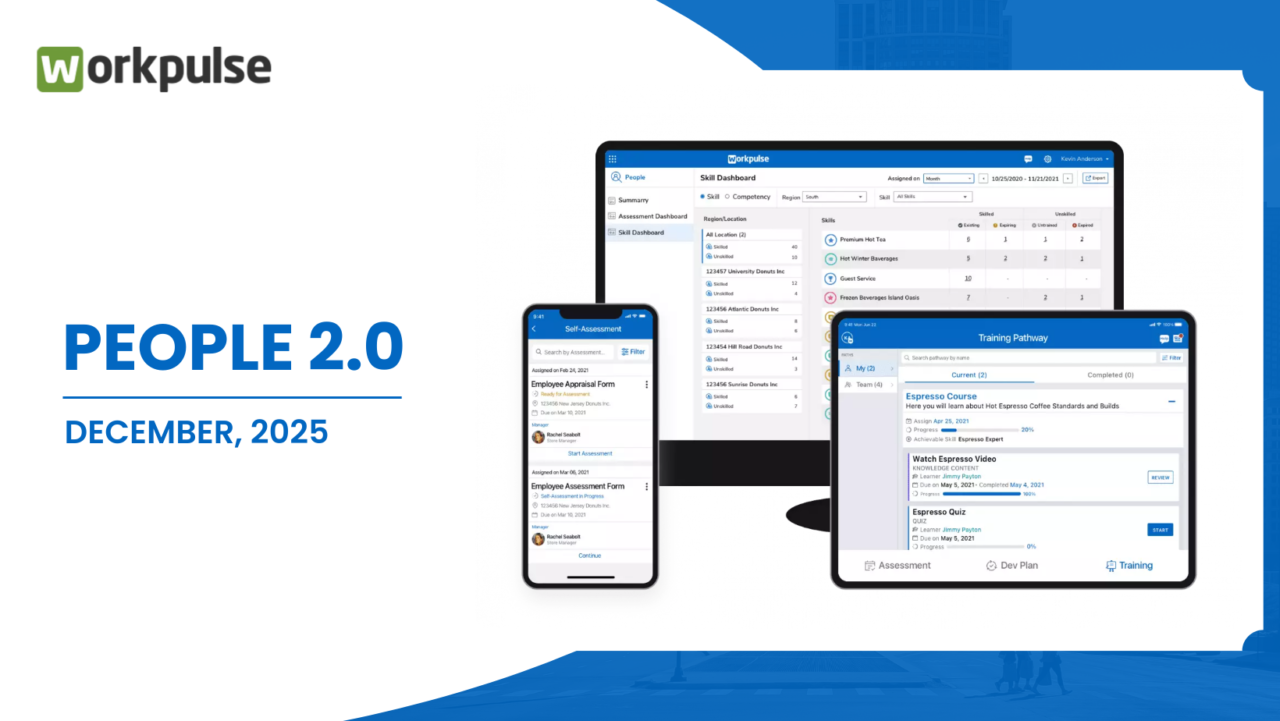
We are very excited to announce new updates for December 2025. The Workpulse People 2.0.0 (forced upgrade) and Desk 2.6.0 will be available on Google Play Store & Apple App Store from December 2025.Available as an app for IOS and Android in the App or Play store.
People App (Redesigned and Upgraded)
(People app is a forced upgrade to People 2.0.0)
The People application has been completely reimagined to give you a more powerful and intuitive way to manage your daily tasks, monitor your team’s progress, and engage through feedback. With this update, everything you need is now simpler, faster, and better organized. In addition, the People functionality is now available on the Web Portal. You can access it directly by clicking on the People tile to complete training, assessments, development plans, and submit feedback — all from a single place. based as an upgrade to an existing subscription, package, or platform. To discuss available upgrades to your subscription, contact sales at sales@workpulse.com
What’s New:
● One Consolidated Task List: No more jumping between multiple screens—every to-do task assigned to you is now available in a single, unified listing. This helps you plan, prioritize, and execute tasks without distraction.
● Smarter Task Organization by Reporting Hierarchy: Tasks assigned within your reporting hierarchy are automatically grouped by employee. This gives managers and supervisors better visibility into what their teams are working on, making it easier to track progress, identify bottlenecks, and ensure accountability.
● Introduction of General Tasks: A brand-new task type—General Tasks—has been added. These are simple, open to-do items that can be taken up by anyone in the organization. This makes it easier to share responsibilities and encourages collaboration across teams.
● Completely Redesigned Feedback Experience: The Feedback functionality has been rebuilt from scratch with a modern UI that is cleaner, more interactive, and engaging. Whether you’re giving or receiving feedback, the experience is now smoother, more intuitive, and encourages meaningful conversations.
People – Assessment Revert Functionality
With this update, we’ve introduced a new capability that gives managers and evaluators greater control over the assessment process by allowing assessments to be reverted to a previous stage when required.
Earlier, assessments could move only in a forward (positive) direction once submitted. If any information was incomplete or not up to the expected standard, there was no way to send it back for correction. This limitation has now been addressed.
What’s New:
Revert Assessment Forms: While evaluating employees or reviewing assessments, you can now revert an assessment form to its previous stage if it does not meet the required quality or completeness standards.
● Improved Review Control: This functionality ensures that assessments are thoroughly reviewed and refined before final submission, helping maintain accuracy and consistency in evaluation outcomes.
● Clear and Structured Workflow: Reverting an assessment allows the concerned user to revisit, update, and improve the submission based on feedback, before it progresses further in the assessment workflow.
This enhancement brings more flexibility and control to the assessment process, ensuring that only well-reviewed and complete assessments move forward, ultimately improving the quality and reliability of employee evaluations.
People- Training Pathway Classification – Readiness & Core
With this update, we’ve introduced a new way to structure and manage training pathways by allowing them to be classified into Readiness Pathways and Core Pathways. This enhancement provides greater clarity in skill development, making it easier to design training programs, track employee progress, and assess overall training effectiveness.
What’s New:
●Skill Classification: You can now classify each skill as either a Readiness Skill or a Core Skill, depending on its purpose and importance within your organization.
● Pathway Categorization: Based on the type of skills associated with them, training pathways can now be categorized as Readiness Pathways or Core Pathways, ensuring a clear distinction between foundational readiness training and essential core competencies.
● Improved Training Structure: This classification helps organizations create more focused and meaningful training journeys, ensuring employees receive the right training at the right stage of their development.
● Enhanced Reporting and Tracking: With clearly defined pathway types, it becomes easier to review reports and track whether employees have completed the required readiness and core training, helping managers quickly identify gaps and areas for improvement.
This enhancement simplifies training management while providing better visibility into employee preparedness and skill development across the organization.
Project – Employee and Location Management (Project is available as part of the People app)
We’ve enhanced the Project Management functionality to make managing employees and locations across projects faster, simpler, and more efficient. With this update, you can now add or remove employees and locations directly at the project level, eliminating the need to update each task or task group individually.
What’s New:
●Add Employees at Project Level: You can now add employees directly to a project. This is especially useful when a new employee joins the organization or needs to be assigned to an ongoing project. Once added at the project level, the employee is automatically reflected across all associated tasks and task groups, ensuring consistency and saving time.
● Add Locations at Project Level: Locations can also be added directly to a project. Any location added at the project level is automatically applied to all tasks and task groups under that project.
● Remove Employees Seamlessly: If an employee exits the organization or is no longer required on a project, they can be removed with a single click from the project. This action automatically removes the employee from all related tasks and task groups, keeping the project data clean and up to date.
● Remove Locations Easily: Similarly, locations that are no longer relevant to a project can be removed directly at the project level, and the change is automatically reflected across all tasks and task groups.
This enhancement significantly reduces manual effort and ensures better data consistency, making project management more streamlined, scalable, and easier to maintain.
Why This Matters:
The redesigned People app helps you:
● Stay organized with all tasks in one place
● Work smarter with tasks grouped logically by employee
● Foster collaboration through open General Tasks
● Strengthen culture with an improved feedback experience
This update sets a new benchmark for how you manage people-related workflows in Workpulse, ensuring that you and your teams can focus on what truly matters—getting things done and growing together.